
 Back to Blogs
How to set up Job Profile Builder in SAP SuccessFactors: Essential guide
Are you struggling to maintain consistent job descriptions across your organisation? Job Profile Builder for SAP SuccessFactors delivers comprehensive job profiles that integrate seamlessly across recruitment, performance, succession, and learning modules, streamlining your talent management processes and enhancing employee experience.
Liam Clark
22.01.2026 · 7 min read



What is Job Profile Builder?
Job Profile Builder (JPB) is a platform tool within SAP SuccessFactors that enables organisations to create comprehensive job profiles containing responsibilities, skills, competencies, and qualifications. These profiles explain job characteristics shared across positions, providing consistency in job descriptions throughout your organisation.
The tool organises descriptions into families and roles, creating a structured library that integrates across the SuccessFactors ecosystem. Built on the Meta data Framework (MDF), Job Profile Builder replaces the legacy Families and Roles feature, storing objects and data more efficiently.
Key benefits of Job Profile Builder
- Time savings and efficiency: Information auto-populates across modules, enabling administrators and managers to complete processes more quickly. Users draw from pre-configured content rather than duplicating effort for requisitions or performance forms.
- Consistency across modules: Job Profile Builder serves as a single source of truth, ensuring information remains uniform across the entire SuccessFactors suite. Content shared between modules reduces conflicting information and creates coherent talent management.
- Enhanced employee experience: Employees gain clear visibility into role expectations, required skills, and development opportunities. Job profiles demonstrate that roles are valued and well-defined, helping employees understand career paths.
- Improved recruitment outcomes: Candidates see detailed, professional job descriptions that reflect structured recruitment processes. The Job Analyser feature scans descriptions for potential bias and recommends skills to include.
- Simplified compliance: Job Profile Acknowledgement sends notifications when profiles change. Employees review and confirm updates, with reporting available to track acknowledgements.
Integration points within SuccessFactors
Job Profile Builder extends across multiple modules. Employee Central displays profile information on employee records, including links to complete profiles, skills ratings, and competency assessments. Recruiting pulls information directly into requisitions and job adverts, with competencies and interview questions available during candidate evaluation. Performance and Goals incorporates competencies into performance forms, creating clear connections between role requirements and performance expectations. Succession Planning analyses skills and competencies to identify suitable replacements for critical roles. Learning Management assigns courses based on competencies defined against job codes. Career Development Planning enables employees to research roles of interest and understand required competencies. People Analytics includes Job Profile Builder information in reports and stories.
Setting up Job Profile Builder
Provisioning and permissions
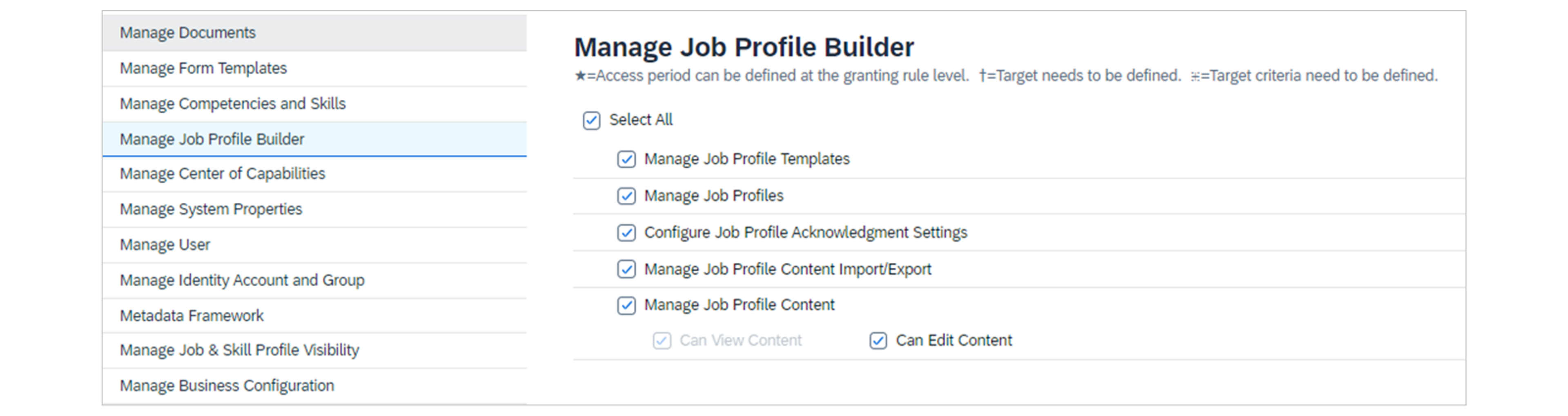
Your implementation partner or SAP support must enable specific provisioning settings before configuration begins. Permissions need to be set for managing Job Profile Builder, viewing elements on people profiles, restricting specific profile areas, and managing skills and competencies. Run the Check Tool before enablement to identify inconsistencies in data or content.
Job families and roles
Job families and roles form the foundation of Job Profile Builder's organisational structure. Families group related roles together, and each role can be mapped to multiple job codes. Ideally, families and roles should align with the job functions and codes structure in your organisational hierarchy.
Source: learning.sap.com
Create families and roles using the Manage Job Profile Content tool. Families must be created first, with roles added as child objects. During setup, skills and competencies can be mapped to both families and roles. The role setup allows mapping of job codes that should be linked to each role. For a head start, families and roles can be imported from Success Store, which includes prepackaged content based on leading practices.
Job profile content types
Content types add substance to job profiles. The following types can be managed through the Manage Job Profile Content tool:
- Certifications list required or recommended certifications for roles.
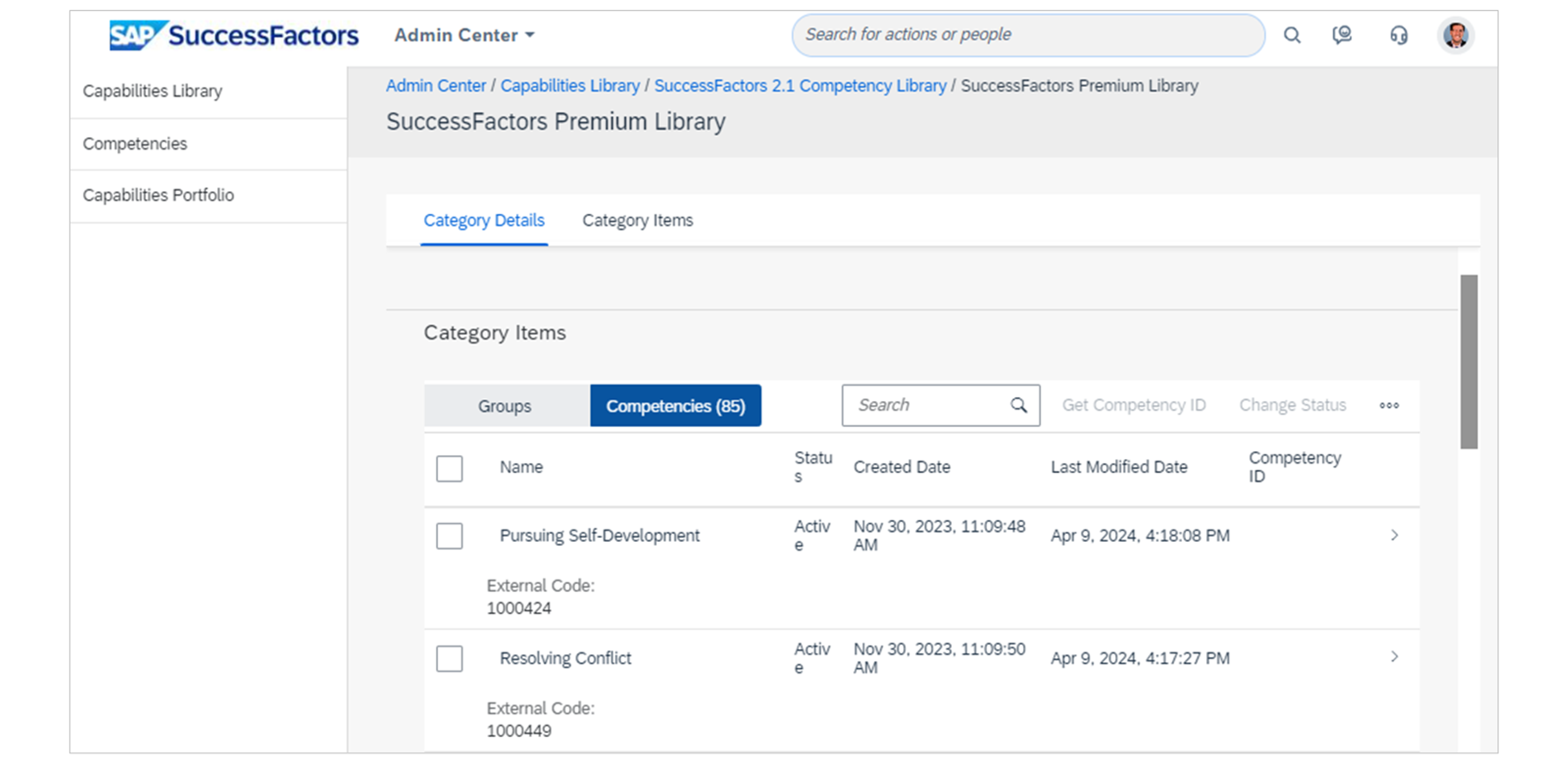
- Competencies define knowledge, skills, and behaviours required to perform jobs well, organised into competency libraries. These are now managed through the Centre of Capabilities feature.
- Education specifies degree types and subject areas.
- Employment Conditions outline working conditions including probationary periods, leave allowances, and employee benefits. Interview Questions provide specific questions for candidates.
- Job Responsibilities describe main duties shared among positions.
- Physical Requirements specify physical and mental activities required for jobs.
- Relevant Industries identify which industries the profile applies to.
- Skills define specific learned abilities needed to perform jobs well, organised into skills libraries with up to five proficiency levels.
For multi-country organisations, content must be defined for each language installed in the system.
Source: learning.sap.com
Job profile templates
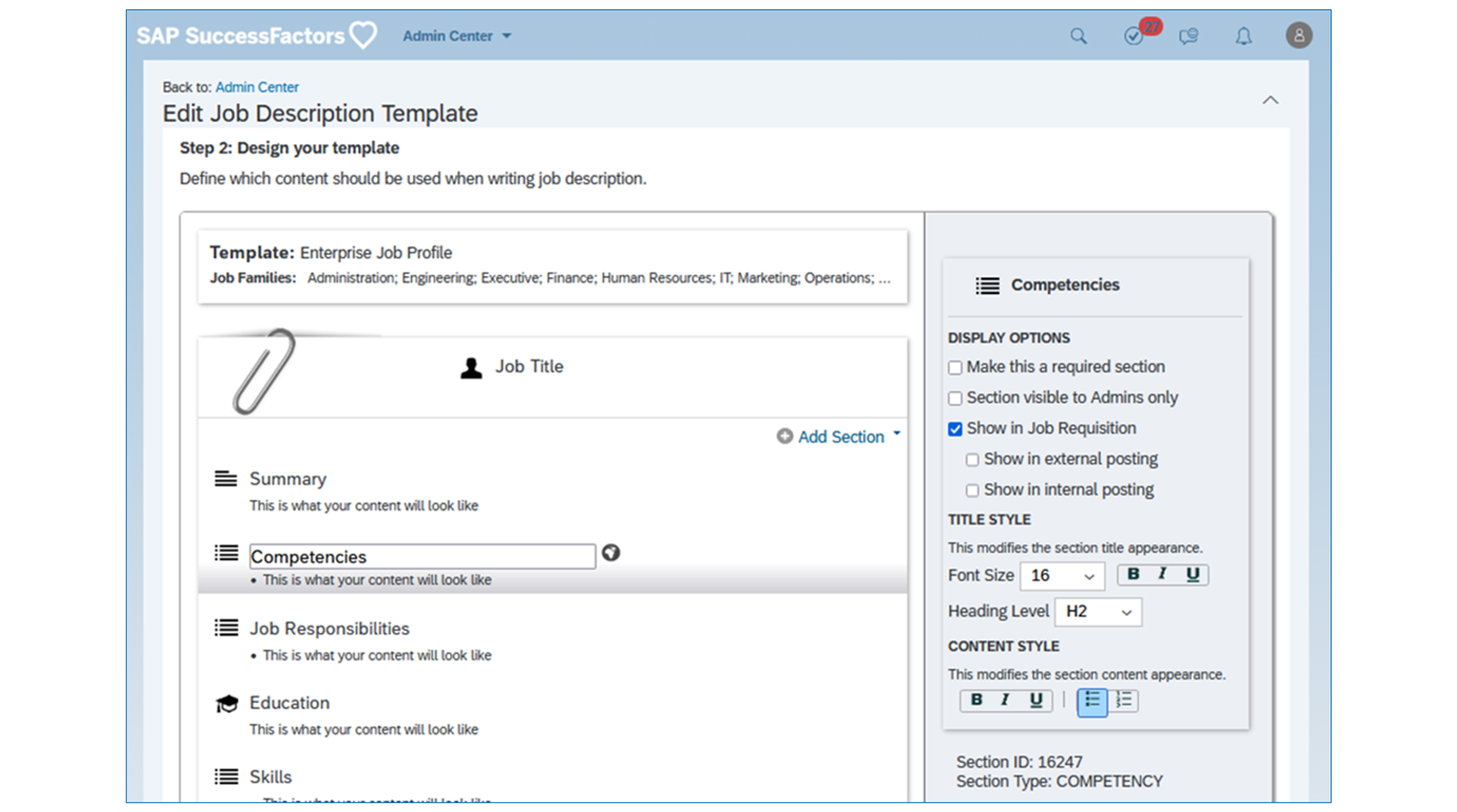
Templates determine the layout and structure of profiles. Using Manage Job Profile Templates, create templates and assign them to relevant job families. Multiple templates can be used if different families require varying content types. Templates include sections sorted in the desired display order, with sections marked as required or admin-only. Font styles can be defined for titles and content, and visibility settings configured for recruiting requisitions.
Source: learning.sap.com
Creating and populating job profiles
Profiles can be populated using the Manage Job Profiles tool. Create profiles at job role level rather than position level to maintain easier management. Within each profile, edit sections defined in the template. Free text areas allow formatted content, and the Job Analyser can highlight potential bias in descriptions. Once profiles are complete, save and activate them. Active job profiles appear across the system in requisition forms, job descriptions, performance forms, and succession charts.
Optional workflow configuration
For organisations granting managers the ability to update profiles, workflow can be added to require approval from HR. Configure a workflow route in Manage Organisation, Pay, and Job Structures and assign it to the Job Profile Draft object in Configure Object Definition. Note that this workflow only applies when profiles are updated from the SuccessFactors Employee Profile Actions menu, not through Manage Job Profiles.
Job profile acknowledgement
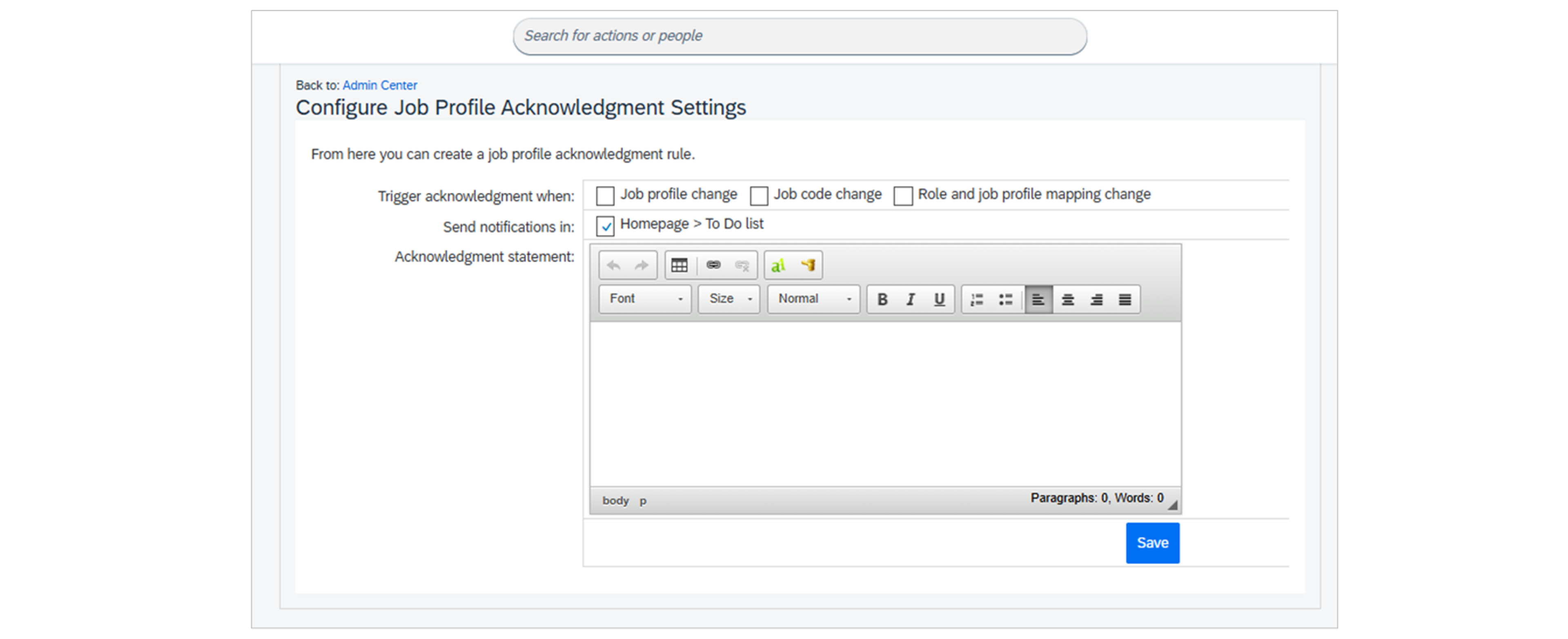
The Configure Job Profile Acknowledgement Settings admin tool enables requiring employees to acknowledge profile changes. Specify when acknowledgement is required, whether notifications should be sent to to-do lists, and provide statements describing what employees need to do. When profiles are updated, affected employees see to-do list items or homepage tiles highlighting changes. Reports confirm who has acknowledged the changes.
Source: learning.sap.com
People profile configuration
The Configure People Profile admin tool enables adding job profile information to employee records. A link to the job profile can be added using a live user profile information block containing the job code as a user field. The Skills Profile block lists all skills from the profile, allowing employees and managers to rate them. The Competencies block feeds in competency ratings completed on associated performance forms.
Source: learning.sap.com
Best practices for successful implementation
- Align job codes and job classifications carefully. Use JOBCLASSIFICATION if Employee Central is implemented, and JOBCODE if not. Ensure job codes are accurately assigned to positions through the position org chart.
- Start with a solid content strategy. Determine your family and role structure before beginning configuration. Conduct strategy and design workshops to define your approach.
- Plan for migration carefully. If migrating from Job Description Manager, use the Check Tool extensively before production enablement. Include migration and creation of new content in project timelines.
- Leverage Success Store content. Import families, roles, and skills from Success Store as a starting point based on leading practices.
- Phase your implementation appropriately. Consider implementing Job Profile Builder alongside recruiting, performance, and succession modules where it delivers the most value.
- Set appropriate permissions. Ensure permissions are configured correctly for administrators, managers, and employees. Consider whether workflow approval is needed for profile updates.
Common challenges
The initial setup requires significant effort, particularly for large organisations with complex role structures. The terminology around jobs, job codes, job classifications, families, and roles can be confusing. Document your structure clearly for administrators and users.
Multi-language organisations face additional complexity, as content must be defined for each language. Plan accordingly and allocate sufficient resources for translation.
Conclusion
Job Profile Builder transforms how organisations manage job descriptions and talent processes within SAP SuccessFactors. The upfront effort delivers substantial long-term benefits through seamless integration, consistency across modules, and enhanced employee experience. Zalaris brings extensive expertise in implementing and optimising Job Profile Builder within the broader SAP SuccessFactors ecosystem. Our consultants understand the complexities of configuration, integration, and change management required to deliver successful implementations.
Get started with Job Profile Builder
Ready to implement Job Profile Builder or optimise your existing configuration? Contact us to discuss how Zalaris can help you leverage Job Profile Builder to transform your talent management processes.
FAQ



Liam Clark
HCM Consultant
Liam is an HCM Consultant of Zalaris UK&I, with a technical and functional background of SAP Products. His current focus is on SuccessFactors Employee Central and Recruitment Modules. Before joining Zalaris at the start of 2021, he worked as a SAP HCM and Payroll Specialist within the UK Public Sector.