

eFile for SAP SuccessFactors
Simplify HR with secure digital personnel files in SAP SuccessFactors
Find, govern, and protect all employee documents in one cloud-based personnel file fully integrated with SAP SuccessFactors.

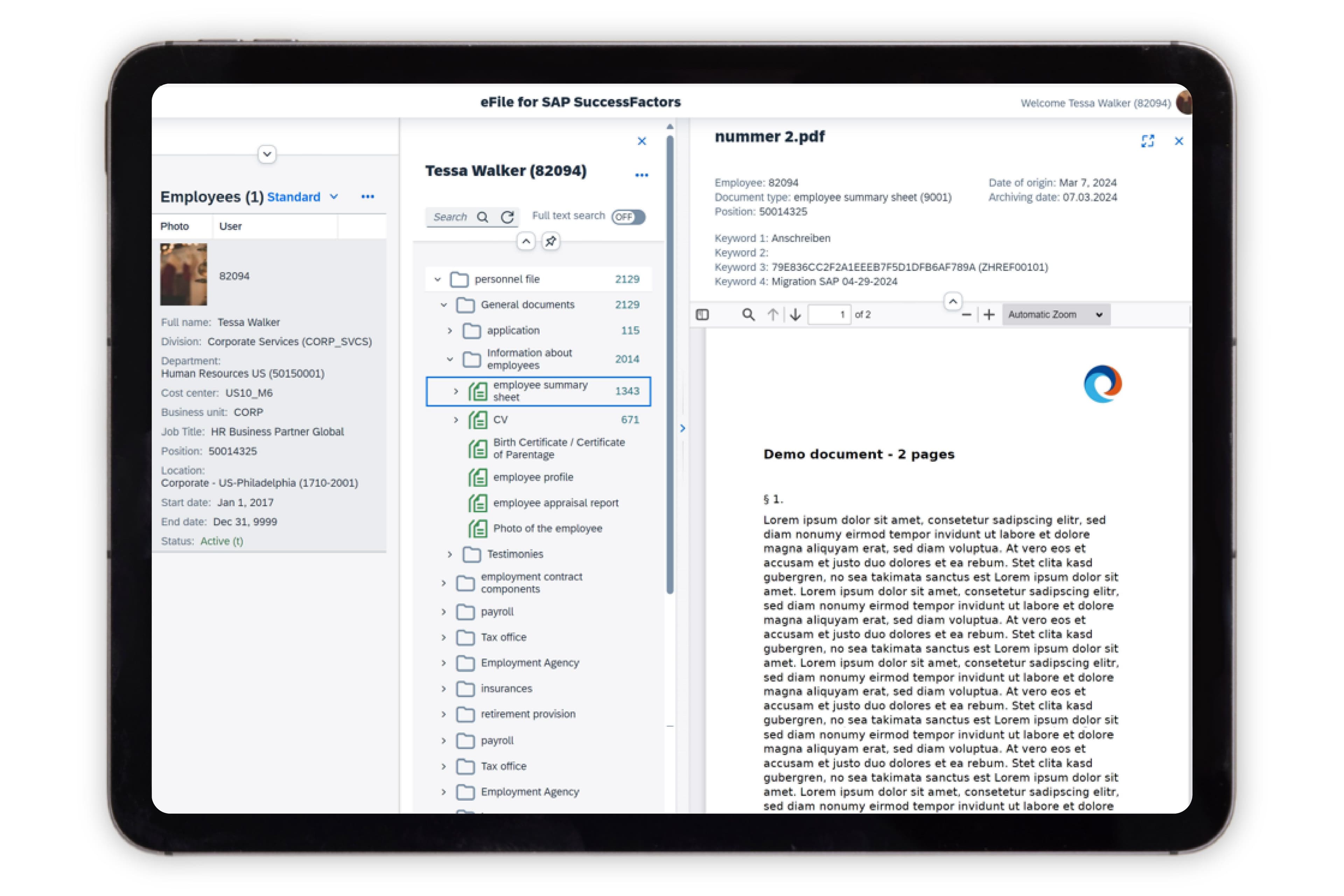
A single, secure personnel file for every employee
Managing documents across shared drives, inboxes, and paper folders slows HR down and increases compliance risk. Zalaris eFile brings everything into one secure, cloud-based personnel file inside SAP SuccessFactors - giving HR a consistent structure, fast search, and governed access so documents are always accurate, complete, and easy to find.
Why organisations choose eFile for SAP SuccessFactors
A secure, standardised digital personnel file inside SAP SuccessFactors that reduces HR workload, strengthens compliance, and prepares your documents for the cloud.
1
Faster HR Operations
Reduce admin time with instantly accessible, consistently structured personnel files.
2
Stronger Compliance Control
Automate retention, permissions, and audit trails to protect sensitive employee documents.
3
Confident Document Governance
Ensure every file is complete, consistent, and aligned to required standards.
4
Lower Operational Costs
Remove printing, storage, and manual handling costs through full digitisation.
5
Quick Time to Value
Deploy in as little as two weeks with a pre-configured SAP SuccessFactors-aligned setup.
6
Available on SAP Store
Certified and validated on SAP Store for quality, security, and seamless integration.
A Unified, Digital Personnel File Embedded in SAP SuccessFactors
eFile for SAP SuccessFactors brings all employee documents into a single, governed digital file directly inside the SuccessFactors experience.
HR, managers, and employees access the documents they need through familiar SuccessFactors navigation - improving transparency, reducing manual effort, and strengthening document governance across the organisation.
Application Areas
My Personnel File (Employee Access)
Give employees clear, secure access to their own documents inside SuccessFactors.
Employees can view contracts, certifications, policies, and other personal documents without relying on HR. This promotes transparency, supports self-service, and ensures information is always accurate and accessible.
Personnel Files of My Team (Manager Access)
Enable managers to access the personnel files of their direct reports within SAP SuccessFactors.
Managers gain controlled access to job-relevant documents such as certifications, training records, and performance documentation. This supports better decision-making, reduces HR workload, and ensures managers have the information they need for compliance and workforce management.
Maintain Personnel Files (HR Access)
A complete document management workspace for HR - built inside SAP SuccessFactors.
HR teams can upload, categorise, review, and govern documents using standardised folder structures and automated rules. Version control, audit history, metadata, and retention policies are applied consistently to ensure accuracy and compliance across the entire employee lifecycle.
Reports (HR Analytics & Compliance)
Monitor completeness, compliance, and document quality across the organisation.
HR can run reports on required documents, expiring certifications, audit-readiness, and retention obligations. This provides a clear governance overview and reduces the risk of missing or incomplete documentation during audits or regulatory review
Platform Capabilities
Unified Digital Personnel File
A single cloud-based file per employee eliminates fragmented storage, ensures consistency, and supports global document governance.
Advanced Search & Fast Retrieval
- Locate documents instantly with:
- Full-text search
- Metadata and tag-based filtering
- Employee-level and population-wide queries
- Greatly reduces HR administration time.
Automated Retention & Deletion Rules
- Govern document lifecycle with:
- Configurable retention policies
- Scheduled deletion workflows
- Policy-driven governance across all documents
- Reduced compliance risk and manual effort
Full Audit Trail & Version Control
- Maintain complete oversight with:
- View, upload, update, and delete logs
- Document versioning
- Change history tracking
- Compliance-ready audit evidence
Native SuccessFactors Integration
- Built to work seamlessly inside SAP SuccessFactors:
- No extra logins
- No external systems to manage
- Aligned to SAP authorisations and security
- Accessible via standard SuccessFactors menus and tiles
- SAP Store validated for quality and performance
Migration Support for SAP HCM → SuccessFactors
- Ensure legacy documents are cloud-ready with:
- Bulk upload and classification
- Clean, consistent folder structures
- Support for historical records
- Improved data integrity during transformation
Performance, Security & Scalability
Enterprise-Grade Security
Uses SAP SuccessFactors access and security models for controlled document visibility.
Scalable for Global Workforces
Consistent governance across countries, business units, and regulatory environments.
Low IT Overhead
Runs inside SAP SuccessFactors - no additional infrastructure or integration maintenance.
The outcome is a simpler, safer, and more efficient way to manage personnel files - fully embedded in SAP SuccessFactors and designed to support HR today and into the future.

See how eFile simplifies document management inside SAP SuccessFactors.
Get a live walkthrough of how Zalaris eFile creates a single, secure digital personnel file inside SAP SuccessFactors, helping HR work faster, strengthen compliance, and simplify document governance.
Book a demoRelated solutions
Optimise workforce planning, analytics, and employee experience with integrated SAP solutions.
Related services
Ensure a seamless, optimised SAP SuccessFactors experience with Zalaris’ expert services.
Implementation Services
Deploy SAP SuccessFactors solutions faster with structured project governance, best practices, and seamless integration with existing HR and payroll systems.Related items


FAQs

Need a smarter way to manage HR and payroll?
Let’s discuss how Zalaris can simplify operations, ensure compliance, and support strategic growth.